Tag Archives: slow sync flash

17 Creative Photography Tutorials to Cure Boredom

Do you sometimes struggle to come up with creative photography ideas, and start to find photography a little bit boring?

You’re not alone. It’s often all too easy to forget what fun photography can be until you start look at the works of others for inspiration. Take these 17 creative photography tutorials for example, they all provide you with a different insight into how to create more interesting photos, for fun.

Night Photography

During the winter months, I used to find that I simply didn’t have time to take photos for fun during the day time anymore, which invariable left me turning to shooting outdoors at night. I didn’t really know what I was doing at first, but I soon learned, and started to love night photography.

You can learn all about night photography in this fantastic ebook: Seeing The Unseen – Landscapes at Night – $15

IMG 5512 17 Creative Photography Tutorials to Cure Boredom

The Brenizer Method

Wedding photographer Ryan Brenizer invented this really cool technique while on his honeymoon which is dubbed “The Brenizer Method”. For those who may or may not have heard of it and are not sure of what this technique is exactly, it’s essentially using a telephoto lens to create a very shallow depth of field as if shot with a wider angle lens. This technique makes a dSLR image look like it was shot by medium format.

brenzier method overlay sample bui photographypp w747 h747 17 Creative Photography Tutorials to Cure Boredom

High Speed Photography

Freezing fast motion (AKA High Speed Photography), can give some pretty special photographic effects. High Speed Photography is used in physics, health research, sports and more. This guide describes how to capture super fast movements using ordinary camera gear and a little home made electronics.

high speed photography glass 17 Creative Photography Tutorials to Cure Boredom

Smoke Photography

Smoke photography can be used to create some awesome looking effects, using flashes, torches, natural light and more, all in a very small space. Once you’re done, you can edit the smoke to appear in a different colour, and merge two photos together to make it appear as if the smoke has come from somewhere it’s not.

smoke photography 4 17 Creative Photography Tutorials to Cure Boredom

Macro Photography

Close-up photography is great for really bringing out the detail of your subject. In this macro photography tutorial, they tell you how to get the best results when shooting macro outside.

Third hand macro tool 17 Creative Photography Tutorials to Cure Boredom

HDR Tutorial

This tutorial will attempt to demonstrate how to make a realistic HDR, one that is virtually indistinguishable from a single exposure. The biggest goal is producing a tutorial that can stand as a standard by which anyone can learn to create a balanced HDR. Ultimately, the processing choices are yours. These are the building blocks.

Also in ebook form: HDR Photography Essentials Pack – $29.

217984503 7128bf9e8c 17 Creative Photography Tutorials to Cure Boredom

Panoramic Photos

Panoramas can produce some awe inspiring photos, providing the viewer with a much wider viewing angle than they would typically see, either from a photo, or their eyes. You can create small panoramas, merging just three photos, or go the full 360, and produce miniature globes like in this post here.

Portfolio Export Print 16 17 Creative Photography Tutorials to Cure Boredom

Milky Way

Learn how to take photos of The Milky Way from Jim Harmer over on Improve Photography. This is something I’ve always wanted to try, but living in the UK (which is much densely populated than the US), it’s hard to find a night sky which isn’t ruined by light polution.

pic 17 Creative Photography Tutorials to Cure Boredom

Slow Sync Flash

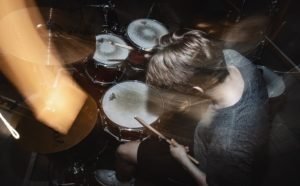
Slow sync flash is when you fire your flash either at the beginning or end of an exposure that’s slower than normal, for example 1/8 of a second. Anyone with experience behind a camera knows that it’s very hard to hold the camera steady enough for a sharp exposure at this sort of speed, and that’s where the flash comes in. By firing the flash, you freeze the motion and collect light trails in the remaining time, creating this rather cool effect, like in the photos below.

slow sync 2 1 17 Creative Photography Tutorials to Cure Boredom

Infrared Photography

Infrared, or “IR” photography, offers photographers of all abilities and budgets the opportunity to explore a new world – the world of the unseen. Why “unseen”? Because our eyes literally cannot see IR light, as it lies just beyond what is classified as the “visible” spectrum – that which human eyesight can detect. When we take photographs using infrared-equipped film or cameras, we are exposed to the world that can often look very different from that we are accustomed to seeing. Colors, textures, leaves and plants, human skin, and all other manner of objects can reflect IR light in unique and interesting ways, ones that cannot be mimicked with tools such as Photoshop.

This is also covered in the Trick Photography & Special Effects Ebook – $47.

Barboursville Vineyards 650x435 17 Creative Photography Tutorials to Cure Boredom

Tilt Shift Processing

A true tilt-shift photo is done using a tilt-shift lens, and they’re typically used for architecture photography, to fix the perspective of buildings when you look up. Recently though, the effect has been used in photoshop to create ‘model village’ style photos, making the whole scene look miniature.

Tilt21 17 Creative Photography Tutorials to Cure Boredom

Colorize a B&W Photo

The process of turning a black and white photo into color can be tricky, depending on the photo you’re working with. Adding color is simple. The tricky bit is the selection process. Without any color, objects have a tendency to blend with each other. This tutorial is meant to demonstrate the process of adding color to a black and white photo.

Airplane 17 Creative Photography Tutorials to Cure Boredom

Black & White Photography

Black and white is nothing new when it comes to art, it’s been going on since the beginning of time and art photography is similar in that it started out as black and white due to technical limitations, way before the dawn of colour film. Even though the majority of photography in done automatically on digital cameras, black and white photography still lives on today.

Union Station 1 17 Creative Photography Tutorials to Cure Boredom

ND Filter Long Exposure

Neutral density (ND) filters reduce the amount of light entering the camera, enabling a longer exposure time than otherwise possible. This can emphasize motion, or make an otherwise tumultuous scene appear surreal and quiescent. Alternatively, an ND filter also enables larger apertures, which can produce a shallower depth of field, or achieve a sharper photo. Either way, this is a useful and often under-appreciated filter that deserves a deeper look.

nd extreme1 17 Creative Photography Tutorials to Cure Boredom

Droste Effect

The Droste effect is an image effect named after a Dutch cocoa company called Droste. In 1904 it produced packaging for its cocoa product showing a woman carrying a tray with a box of cocoa and a cup on it. A small version of the package appeared on the cocoa box on the tray and so on – each version of the image being successively smaller than the last.

This can also be found here: Trick Photography & Special Effects Ebook – $47.

Photoshop droste effect before after tm 17 Creative Photography Tutorials to Cure Boredom

Light Painting

In short, it’s a fun, easy way of getting some really cool photos. You don’t need to spend hours looking for a cool location, light painting can be done just about anywhere, so just follow my step by step, insightful, thought process about taking great light painting photos and you’ll be well on your way.

Again, this is a chapter in: Trick Photography & Special Effects Ebook – $47.

IMG 9838 2011 05 04 at 23 42 08 17 Creative Photography Tutorials to Cure Boredom

Mini-Planet Polar Coordinates

To make a long story short: The “Polar Panorama Effect” is one of my favorite ways to process photos into unique pieces of art. It takes a panoramic (or landscape) photo and uses the Polar Coordinates filter of Photoshop CS or The Gimp to create a circular image that seems to wrap the panorama around a planet.

Guess what? You can also find it here: Trick Photography & Special Effects Ebook – $47.

screenshot5 17 Creative Photography Tutorials to Cure Boredom

17 Creative Photography Tutorials to Cure Boredom1 17 Creative Photography Tutorials to Cure Boredom

30 Day Photography Challenge Project

This is my brand new 30 day photography challenge, and I want YOU to take part too. For my next 30 posts, I’m going to be providing you with tips on how to take the photos that I’ve listed here, and sharing my own results (and I encourage you to share yours too).

Starting today, I will be posting 5 posts a week on here, as well as over on my Facebook page, Twitter and Pinterest.

As I complete the project, I will be posting links to the different photos and tips as I complete them, and the days below will turn from black to blue (links). Follow through the links for tips on how to take part yourself.

Take Part

If you want to take part yourself, then just come over to my Facebook page, Twitter and/or Pinterest, and share your photos with me and the rest of the community. The best photos will be added to the posts, and shared with tens of thousands of people.

That’s all you need to know really, hope you enjoy these different ideas; they will certainly help you to improve your photography.

The Challenge

Day 1: Self Portrait - Complete! – Your photos added.

Day 2: Rule of Thirds - Complete! - Your photos added.

Day 3: Black & White - Complete! - Your photos added.

Day 4: Texture - Complete! - Your photos added.

Day 5: High Angle  – Complete! - Your photos added.

Day 6: Low Angle - Complete! - Your photos added.

Day 7: Silhouette - Complete! - Your photos added.

Day 8: Sunset - Complete! - Your photos added.

Day 9: Bokeh - Complete! - Your photos added.

Day 10: Lens Flare – Complete! - Your photos added.

Day 11: Landscape - Complete! - Your photos added.

Day 12: Portrait - Complete!

Day 13: Dynamic Tension - Complete!

Day 14: Light Painting - Complete!

Day 15: Colorful Water Drops - Complete!

Day 16: Balanced - Complete!

Day 17: Unbalanced - Complete!

Day 18: Frame within a Frame - Complete!

Day 19: Panorama - Complete!

Day 20: Depth - Complete!

Day 21: Water Splash - Complete!

Day 22: Slow Sync Flash - Complete!

Day 23: Panning - Complete!

Day 24: Harris Shutter - Complete!

Day 25: Shallow DoF - Complete!

Day 26: Light Graffiti - Complete!

Day 27: Street Photography - Complete!

Day 28: Architecture

Day 29: Night - Complete!

Day 30: Hidden Camera Mirror Photo - Complete!

Pin This icon wink 30 Day Photography Challenge Project 30 Day Challenge 30 Day Photography Challenge Project

3 Steps to Taking Great Party Photos

Introduction to Party Photos

We’re reaching the end of October now and with Halloween just a few days away, party season is well and truly here. A post on party photography might seem like a weird idea, but it’s not as simple as you may think; that is, if you want to get good party photos. I’m known amongst my friends for my photography at parties, because I regularly have my camera with me, and record the parts of the night that are often forgotten by morning.

Step 1 – Setting up your Camera

Assuming that your party is either in the evening or indoors, you’re going to want to set your camera to manual mode to take control of the exposure. In low light conditions, you basically have two main options; you can either widen your aperture to capture the most light, or use a flash. These produce great results, but there’s plenty to be aware of before diving straight in.

Firstly, think about your personal style, do you prefer candid photography, or posed group photos? If you like candid photography, then wide aperture is a great choice, but you need to be aware that you’re still going to have people come up to you ask for a group photo, and with a wide aperture, comes a shallow depth of field, which won’t work out so well. If you’re more into group photos, then you need to have a deeper depth of field, and to make up for the lack of light, you’ll have to use a flash. It’s no secret that pop-up flash photography looks pretty terrible and is capable of ruining a photo, so use an off camera flash if you’ve got one, or try some of the techniques which we’ll get to in a bit.2011 01 08 at 00 34 09 3 Steps to Taking Great Party Photos

Make sure that your camera mode is in manual, and then start taking some test shots because it will help you to understand what you need to get a good exposure. It helps to know how your camera responds to particular lighting, because then it’s easier to set up your camera. I know that my camera doesn’t handle the ISO very well when it gets past ISO1000, so I set my ISO to there and work with my aperture and shutter speed after that. You’ll likely find that you shoot much wider angles at parties, which is good because it makes it easier to hold the camera steady at say, 1/50 of a second. So with my ISO at 1000 and my shutter speed at 1/50, I can easily play around with my aperture, depending on the light and the lens.

Aperture is the one thing that you’ll probably struggle with at a party, purely because of the depth of field, so if you’re happy to carry around an extra lens, say a f/2.8 or f/3.5 kit lens, then that can really help you out. If you can shoot without a flash while using a wide aperture, then that’s great because the lighting will look a lot more natural, but if not, then you’ll want to use a flash. The reason I say carry an extra kit lens, because if you’ve got a 50mm or a 35mm, then you’re gonna find that you want a wider angle than that when you’re shooting at a party, and if you’re using a flash and a narrower aperture anyway, it might as well be on a zoom lens.

Step 2 – Using The Flash

As I mentioned above, regardless of your style of photography, if you’re at a party at night or indoors, then you’re going to end up using a flash to help with the lighting. I strongly recommend the purchase of an external flash unit, but if you don’t have one, then we’ll get to your options in a bit. The great thing about an off external flash unit is that you can bounce the light off the ceiling to produce a more natural light, or you can use a diffuser to as a small light box to bounce the light indoors or outdoors. You can also buy transmitters for your flash too, so you can take the flash off the camera and have it coming from a different direction, although this is probably a little advanced for most parties.

Below is a photo which was taken indoors with the flash turned slightly behind me and pointing up to the ceiling, which you can see in the reflection in the mirror. This keeps a good amount of shadows still on the face and makes it look more like no flash was used at all. This sort of style is really good for casual parties, where you’re at a friend’s house and there’s no fancy lighting. The photo was taken at ISO 400, f/3.5 at 1/100 of a second, which allowed for more light because of the confined conditions and bounce flash.2011 01 08 at 00 09 11 3 Steps to Taking Great Party Photos

If you want to go the extra mile and use an off camera flash, then you can produce some better lit photos without making the lighting too garish. I used a Speedlight Transmitter for my photo below, and moved the flash around to the side. Because it was almost dark out, I had to push my ISO to 800, while narrowing the aperture to f/2.8. Because I was using a flash though, I knew the bust of light would freeze the motion, so I wouldn’t have to worry about movement in the photo. I did however want a bit around the moving bottle, so I chose a speed of 1/60. The more you use your camera, the easier it will be to make these decisions without having to think about them.Ben Katie McGowan BBQ 310711 8362 3 Steps to Taking Great Party Photos

If you don’t have an off camera flash unit, and you want to be able to use your flash, then I would recommend trying some slow sync flash. This involves using your flash, but setting your camera to manual so that you can allow for more ambient light and creative blur. This stops the camera for focusing so much on the bright direct light from the camera, and more on the ambient light in the background. The photo below is an example of slow sync flash, with direct light, although I did take it with an external unit as I had one on me. You can choose whether you want the flash to fire at the beginning or end of the exposure, depending on what you want the photo to look like. ISO500, f/3.5 for 1 second. 3 Steps to Taking Great Party Photos

I’ve shown you photos where you can easily bounce some light without having to push your camera too hard, but what about when it’s not so easy? You just need to remember that you have to work with whatever you’ve got, so if you’ve got limited gear, then use the techniques I’ve spoken about, but I would suggest a higher ISO so you can allow for more ambient light and can turn down the flash exposure compensation. It’s more about technique and composition than anything.IMG 8453 3 Steps to Taking Great Party Photos

Step 3 – Photos to Take

It’s all dependant on your personal style really, but if you’re being paid to take photos at a party, then there’s going to be a certain type of photo that is required of you. Think about what’s going on and who’s important at the party, and that should give you a good indication as to what sort of photos you should be taking. Here’s some of the photos that I like to take.

My personal style is fairly candid, so I like to shoot without a flash and capture moments that other people tend to miss. It gives a nice view over the party, as it captures the party for what it really is; a natural smile is ten times better than a posed one. 3 Steps to Taking Great Party Photos

The photo below was taken at a 30th birthday party, and it’s the birthday boy and his mum. I saw him walk past his mum and stopped him for the photo because this sort of photo is important to them, and they may have forgotten otherwise. You need to have a good amount of photos of the most important person at the party, without neglecting the rest of the guests.IMG 7713 3 Steps to Taking Great Party Photos

By all means enjoy the party, but be prepared with your camera so that you can take photos of anything interesting that’s happening. This is more of an action shot as you see the arm wrestle between the man and the girl, while just as importantly, you have all the heads surrounding them, looking on. This was shot at 24mm, which was as wide as the lens would go. I couldn’t have gotten this photo at a longer focal length with my primes lenses.2011 01 07 at 22 45 44 3 Steps to Taking Great Party Photos

Later on in the evening, when everyone has had a few drinks and loosened up a little bit, you’ll start to have people approach you for photos for group shots, and that’s a good thing. If they come up to you, then the photos are typically going to be a lot more fun to take and produce better results. This sort of shot is essential for any party really because it makes it look as fun as it was, and when it’s looked back on, they’ll remember it better.IMG 7862 3 Steps to Taking Great Party Photos

Finally, it’s always good to get personal shots of just a single person as they’ll have something to take away from it too. It doesn’t matter who you’re shooting, just make sure that they’re happy to have their photo taken and enjoying themselves.BT Tower London 8972 3 Steps to Taking Great Party Photos3 Steps to Taking Great Party Photos 3 Steps to Taking Great Party Photos

How to Capture Awesome Nightclub Photography – 5 Easy Steps

Introduction to Club Photography

Nightclub photography is becoming increasingly popular, with a lot of young photographers using it as their way into finding their first paid photography work, while enjoying themselves at the same time. I often walk straight into clubs with no photo pass or anything, just a camera slung round my neck, and nobody ever asks any questions – it’s a great way to start getting more experience.BTL 13570 How to Capture Awesome Nightclub Photography   5 Easy Steps

Step 1 – Technique and Equipment

You’ll find that you’ll start to employ a lot of techniques from low light photography, night photography, light painting and slow sync flash, as you’re often left to make do in low light. As far as gear goes, if you want to actually come out with some good photos, you really need to have an external flash, but you can get away without one if you’re doing basic slow sync flash.

Here’s the kit that I use:

  • A camera body, preferably a newer one as they deal with high ISO a lot better.
  • Wide aperture lens, preferably f/2.8 and below, with the lens hood on (we’ll get to that).
  • A wide angle lens, so that you capture a lot is cramped conditions.
  • An off camera flash with a diffuser if you’ve got one.
  • A transmitter for you flash would be ideal if you want to up your game.

Step 2 – Setting Up Your Camera

When I walk into a club, the first thing I do is go to the places that I’m going to be spending the majority of my time shooting and find out what settings I’m going to use. Because the lighting is fairly controlled, I can set my camera to manual and set up different exposures for different situations and then save them to my custom dials.

A great way to ensure that you include enough ambient light is to set your camera to aperture priority with your ISO set and your aperture wide open and see what it tells you. I did this about half way though the night as it just confirmed my beliefs that it would be around 1/13. If you’ve got custom dials, I strongly suggest you look up how to set them on your camera as they can come in very handy (it’s easy to do), but if you don’t, then don’t worry, just keep your camera on manual. The two different places I might find myself shooting are in the crowd and at the DJ booth, so I adjust my camera for those.BTL 13820 How to Capture Awesome Nightclub Photography   5 Easy Steps

For the majority of my shots, my ISO is set to somewhere around 1000-1600, my aperture is almost always completely open (which will be f/2.8 for most of these photos), and my shutter speed ranges anywhere between 1/8 to 1/50 of a second. The ISO and aperture deal with all the ambient light whereas the shutter speed is used to freeze the motion, with the help of an off camera flash.

Step 3 – Different Photos To Take

There are five main shots that I like to take:

  1. DJ photos
  2. Crowd
  3. Venue
  4. People
  5. Staff

Starting with the obvious, you’re going to want to take photos of the DJ, especially if they’re a big name act and not just the house DJ. The way this differs to the rest of the club is that there is usually more lighting so that the DJ can see what they’re doing, which can often ruin the shot. For the photo below, I set my camera to f/2.8, ISO1000, at 1/25 of a second and pointed my flash upwards at quarter power without a diffuser cap, but the little white reflector sticking out. This shone enough light onto the subject while giving them the dark eyes I was looking for. The slow speed and wide aperture allowed some ambient light onto the DJ’s shirt which helped to make it more interesting.BTL 13781 How to Capture Awesome Nightclub Photography   5 Easy Steps

When you compare that you a higher budjet production of a dance music festival, you have a lot more light to play with and you’re not bothered by the small table lamps which are lighting up the equipment. I had so much more light to play with, my ISO was on 1250, aperture was set to f/2.8, but my shutter speed was set to 1/1000 as this DJ was prone to faster movement than this. I’ll move on to more creative photography for DJ’s in a bit.Outlook 2011 12850 How to Capture Awesome Nightclub Photography   5 Easy Steps

Crowd shots is something the promoter is going to be looking for as it helps them to promote their night, so you’ll want to make sure that you get as many of these as possible, particularly during the headline act. If you’ve got a flash then it’ll likely come in quite handy if you’re taking photos of small groups of people like in the club that these photos were shot. The light would be lost in larger clubs, but there would be a lot more lighting to help make up for that. Have a look at the photo taken below which used a flash, and then move on to the photo I took without to see the difference. This photo was shot at 1/13 of a second to allow the light and smoke from behind to creep through.BTL 13794 1 How to Capture Awesome Nightclub Photography   5 Easy Steps

When you’ve not got a flash, you can rely on the club’s lighting a lot of the time, but you will want to turn up your shutter speed as movement will be detected a lot easier without a flash. The photo was shot the same as the one above, only I turned up the shutter speed to 1/50 to freeze the motion. The photo below is one of the reasons I enjoy taking photos at live music events – the lighting allows you to get a lot more creative.BTL 13577 How to Capture Awesome Nightclub Photography   5 Easy Steps

Venue shots are important because they’re used to promote nights over Facebook so try to include a few of them. I’ll go into more detail about how to take these photos so that they’re a little bit more interesting, but for now we’ll focus on exposure. This photo used a flash, but it was diffused and bounced off a wall so it’s well hidden. Again, the photo was shot at f/2.8, ISO1000 at 1/40 of a second.BTL 13554 How to Capture Awesome Nightclub Photography   5 Easy Steps

Photos of people are fairly important as promoters often use this to promote their night again, by watermarking the images and tagging the photos so that people can see them. I don’t have an ultra-wide angle lens but these are typically used to capture as many people in the photo as possible while providing a cool fisheye effect. I personally think that this is a little bit over used and doesn’t look very original anymore. Again, ambient light is key here so keep the settings much the same, and if you don’t want the photos to look flat, point your camera upwards and use a diffuser on it to act as a light box.BTL 13547 How to Capture Awesome Nightclub Photography   5 Easy Steps

Lastly, if I know the staff want photos, or it’s a particularly special occasion, I’ll try to take photos of them too. This is good for when someone wants to become the face of the night and not a name, and you’ll often find this happens with much smaller nights. The settings you might use are much the same as the other photos, depending on the location, but you have much more freedom to play around as you can take them pretty much wherever you want.BTL 13526 How to Capture Awesome Nightclub Photography   5 Easy Steps

Step 4 – What to Watch Out for

This is a small list on how to look after your gear in a nightclub environment:

  • Drinks. They get spilt by drunk people all the time so watch out for anyone who’s had too much to drink, and keep the lens hood on your camera to protect from any splashes.
  • Thieves. Nightclubs are probably a bit worse for people stealing stuff so either keep everything on you where you can look after it, or keep it somewhere that you know is safe, like in the DJ booth or with the promoter.
  • Loud music. Pick up some earplugs at the beginning of the night as you’ll likely be subjected to a lot of bad/loud music which will damage your hearing before long.

Step 5 – Ideas For Different Styles

Context is important in anything you take a photo of, and this can be done pretty simply by following the rule of thirds and including some background detail to a photo. Again, I know I’ve been banging on about this, but if you want it to work, you’ve got to include some ambient light. Contrast that with a flash like I’ve done below and you’re onto a pretty good thing.BTL 13562 How to Capture Awesome Nightclub Photography   5 Easy Steps

Slow sync flash allows you to capture the movement of a subject without producing a blur which takes away all the detail. I’ve written a whole blog post on it which can be found here, but it’s pretty simple to get your head around. Play around with the shutter speed to match the speed of movement of your subject and you’ll soon come up with some cool photos. Again, this works better in more exciting lighting as it produces a more interesting effect, but if the lighting is particularly dull, try and use the lights from the DJ mixer to produce some light trails.BTL 13736 How to Capture Awesome Nightclub Photography   5 Easy Steps

Black and white photos are really good at producing a certain mood and they’re very useful if the lighting isn’t very good. The style of music which was being playing the the photo below was very bass heavy and minimal, so using black and white worked really well.BTL 13564 How to Capture Awesome Nightclub Photography   5 Easy StepsHow to Capture Awesome Nightclub Photography 5 Easy Steps1 How to Capture Awesome Nightclub Photography   5 Easy Steps

Use Slow Sync Flash to Easily Produce Creative Lighting

What is Slow Sync Flash?

Slow sync flash is when you fire your flash either at the beginning or end of an exposure that’s slower than normal, for example 1/8 of a second. Anyone with experience behind a camera knows that it’s very hard to hold the camera steady enough for a sharp exposure at this sort of speed, and that’s where the flash comes in. By firing the flash, you freeze the motion and collect light trails in the remaining time, creating this rather cool effect, like in the photos below.

Why You Would Use This

The main advantage of having a longer shutter speed is that it allows you to collect more ambient light into a photo, and the flash firing helps to maintain a relatively sharp image. When you’re forced to shoot in low light conditions, but still want to maintain plenty of the ambient light detail without a high ISO, your best option is to use a slow sync flash. Below is a photo shot at 1/8 of a second with the flash firing, and below that is the same photo shot at a comfortable handheld speed of 1/50 of a second, again with the flash firing. Notice the different in background detail in the ambient light and how the movement is almost unnoticeable in the first photo with the shower shutter speed. slow sync 1 Use Slow Sync Flash to Easily Produce Creative Lightingslow sync 2 Use Slow Sync Flash to Easily Produce Creative Lighting

How To & Movement

All you need to get this to work is a camera with a flash and the ability to change the shutter speed, after that you have 2 options; 1st (front) curtain sync and 2nd (rear) curtain sync. Without going into too much unnecessary detail about this means, 1st curtain flash means that the flash is fired at the beginning of an exposure, and 2nd means that the flash is fired right before the end of the exposure. The importance of choosing the right one comes down to the fact that there is invariably going to be movement when you take a photo, and when you fire the flash dictates the type of blur you’re going to get.

1st Curtain Sync.

This is the standard way of shooting with a slow sync speed and doesn’t require any special setting up to achieve, other then adjusting your shutter speed. The flash will fire when you press down the shutter and the camera will continue to record any light for the remainder of the exposure. The main issue with shooting like this is that any movement will record the light over the top of the original exposure, dulling it and making it appear less sharp. Have a look at the photo below and you’ll notice that the light streaks come after the original exposure and over the top of any potential subjects. Use Slow Sync Flash to Easily Produce Creative Lighting

slow sync 4 Use Slow Sync Flash to Easily Produce Creative Lighting

2nd Curtain Sync

When you change your flash setting to fire at the end of an exposure, you exposure your subject over the top of any streaks or blurs that have taken place in the time that your shutter has been open. Any light streaks now go towards and end at your subject, helping to draw the attention to them. Most cameras are different, so look in your manual, but to set your flash to rear curtain sync on an external unit, it usually just consists of the click of 1 button.2nd Use Slow Sync Flash to Easily Produce Creative Lightingslow sync 5 Use Slow Sync Flash to Easily Produce Creative LightingAdding movement to your camera while taking the photo produces some really cool effects like in the photos below. I moved the camera from side to side for the first photos, up and around the sky in the second one and I zoomed in during the exposure of the third one. There’s plenty of fun to be had playing around with this technique, but I recommend you have a good look around the scene first to see what available light you have and to see what would work for your photo. slow sync 1 1 Use Slow Sync Flash to Easily Produce Creative Lightingslow sync 2 1 Use Slow Sync Flash to Easily Produce Creative Lightingslow sync 7 Use Slow Sync Flash to Easily Produce Creative Lighting

If you have any questions, please feel free to leave a comment and I’ll get back to you.Use Slow Sync Flash to Easily Produce Creative Lighting Use Slow Sync Flash to Easily Produce Creative Lighting