Tag Archives: 30 Day Photography Challenge Tips

How to Create Impressive Light Graffiti

What is Light Graffiti?

It’s pretty simple really. You take a long exposure, and use a light source to paint graffiti in the frame. You can do this with a torch, a sparkler, a fire, or even a still light source by moving your camera.

If you’ve read all about light painting, then you’ll have a good understanding of how this works. Basically, when you’re shooting in very low light, your camera’s sensor is effectively a blank canvas. And just like in light painting, you use your light source to paint/graffiti on where you want the camera to expose.

Exposure

Firstly, you’re going to want to set your camera to manual mode; this will allow you to make the most out of your shutter speed. Unlike on Shutter Speed Priority mode, you go all the way past 30 seconds on the dial, and you will be taken to bulb mode. This means that the camera will expose for as long as you hold down the shutter. I recommend using a cable release for this.

Your shutter speed will depend on how long you need to complete your painting, and then you can then give priority over to Aperture and ISO. If you’re creating a really deep photo, then you’re going to need to have a narrow aperture, which allows less light into the camera, and will pose other problems for you, which will ultimately result in longer exposures and a high ISO.IMG 5216 How to Create Impressive Light Graffiti

Depth of Field

DoF is vital to completing a good light graffiti photo, because if the photo is out of focus, then it’s going to stand out like a sore thumb (for all the wrong reasons).

Check out my photo below, it’s a cool photo, but it’s out of focus. Focusing in low light is really hard, so I recommend two options. Either focus manually, or shine a light on where you’re going to focus, focus automatically, and then switch to manual focus so that it doesn’t adjust when you go to take the photo.IMG 4961 How to Create Impressive Light Graffiti

I’ve seen some really amazing light painting photos, just google it, and a lot of these photos require a good depth of field to work. When it’s a small and simple light source, it’s not so obvious, but start getting really creative, and you can start to tell.

As you should all know by now, to produce a deeper depth of field, you’re going to have to narrow your aperture, which in turn, will provide your camera with less light for your exposure, so bear that in mind.

Light Source

Honestly, go crazy with this. I’ve use sparklers, torches, flashlights, fire, LED’s, even my phone. If it makes a light, then you can use it, and why not? One light source which I’m yet to try, is [amazon_link id="B005HROJVM" target="_blank" ]glow sticks[/amazon_link]. They stay bright for ages, come in a variety of colours, and are reasonably cheap too.

If you’re using a torch, be careful not to shine this directly into the camera, or the light source will start to appear uneven.

IMG 4964 How to Create Impressive Light Graffiti

Graffiti Game

I’m not really that big on my Light Graffiti, I prefer night photography, but one game I have played is a form of Pictionary. You get together with a group of friends, and draw something with your light source, while everyone else has to guess. It’s a fun and creative way to spend an evening.IMG 4966 How to Create Impressive Light Graffiti

Lets see your photos! Leave a comment below, or leave a link on the fan page under the correct link, or post it on the wall. If you’re copying straight from Facebook, please remember to copy the image location/URL and not just the link in the address bar.

You can follow the progress of this project on FacebookTwitter and Pinterest.How to Create Impressive Light Graffiti How to Create Impressive Light Graffiti


How to Use Panning to Capture Moving Objects

Panning photography is something which I’ve spoken about when discussing shutter speed, but never really went into any great detail. It’s an excellent way of capturing moving objects, without the whole photo becoming a blur, by moving your camera at the same pace as your subject.

How it’s Done

Shutter Speed

The first thing you will want to do, is adjust your shutter speed to capture the movement of a subject, without freezing them. I usually find that anywhere between 1/15 of a second, and 1/200 of a second can work, it all depend on what you’re capturing, and how they’re moving.

Be careful not to go too slow though, or you’ll ruin the effect altogether.

Focus

The next step requires careful focus, because there’s a strong chance that the subject is moving slightly closer or further from you. I would suggest using AI SERVO / AF-C focus mode, because it will track the subject with the focus, and predict where they’re going to be in the time it takes for the shutter to go up.

You will typically use this mode when you’re taking multiple images of a moving subject, but it works in the same way here.

Tracking

Hold your camera correctly, and track the moment of your subject. You need a smooth, fluid motion for this photo to work. If you’re moving too fast, or too slow, then the whole photo is going to come out as a blur.

The reason panning works is because your camera is moving at the same pace as the subject, so they’re effectively still in the frame, while everything else around them is moving. This really isn’t as hard as it sounds, a lot of it comes down to your choice in shutter speed.

Speed

Like I said, the success of your photo is likely going to come down to your speed of your exposure. When your subject is nice and close to you, then if they move a foot in front of you, that’s going to take them much further across the frame than if they were 100 feet away. This means that you need a faster shutter speed for subjects that are closer to you.

Generally speaking that it.

You see, objects that are further away are often further because we can’t get as close, usually because they’re moving so fast, or they’re very large. Think of planes, trains, and automobiles. This photo below was taken at 1/160 of a second, because I was also in  a moving vehicle, moving at roughly the same pace.IMG 8715 How to Use Panning to Capture Moving Objects

Flash

There’s no reason why you’ve can’t add a flash to your photo, and start implementing some of the slow sync flash techniques that I go into detail about here.

You set off the flash at the beginning of the exposure to freeze the motion, and then you carry on as you would with any other panning photo.

Using a flash can really help if you’ve only just started learning this technique, because you can adjust your shutter speed using bulb mode. If you put your camera into manual, go all the way past 30 seconds, you will reach bulb mode. This means that for as long as you hold down the shutter, the exposure will continue. You simply set the exposure for the flash, and you can vary the length of shutter speed, depending on how fast your subject is moving.Outlook 2011 10527 How to Use Panning to Capture Moving Objects

Troubleshooting

If you’re having trouble getting this to work, then chances are that you’re either not using the right shutter speed, or you’re messing up the focus.

Shutter speed is key, because the longer you set it to, the higher the probability of everything going wrong. I suggest faster speeds if you’re struggling.

Focus is a big issue, especially when you’re trying to track a subject’s movement before they get close to you to take a photo. If you do have a problem, then I would suggest switching to manual focus with a narrow aperture, and waiting for your subject to come into a certain point before taking the photo.

That’s it!

Lets see your photos! Leave a comment below, or leave a link on the fan page under the correct link, or post it on the wall. If you’re copying straight from Facebook, please remember to copy the image location/URL and not just the link in the address bar.

You can follow the progress of this project on FacebookTwitter and Pinterest.How to Use Panning to Capture Moving Objects How to Use Panning to Capture Moving Objects

Lens Flare – 30 Day Photography Challenge Tips

If you’re shooting into the light, then you’re going to encounter lens flare at some time or another. This happens when you’re looking at the sun, or even just a single light source, such as a flashlight.

Often lens flare is undesired, and it can be removed with a simple trick, but for the purpose of this post, we want it.

Shoot into the Sun

This is something I’ve written about in the past, and the main points you want to remember is to use spot metering mode on your subject, and expose accordingly. By that, I mean that if you want to prevent your subject from becoming a silhouette, then it’s best to set your to camera manual, and adjust the exposure yourself.

The sun will produce these lovely flares of light as they pass through your lens, and there you have it, you’ve got some pretty lens flare.IMG 9265 Lens Flare   30 Day Photography Challenge Tips

Use a Flash

The photo below actually uses a flash as the light source, in an effort to mimic the lighting that could have been there. As you can see, you still get a very similar effect. There is slightly less of it though because the light isn’t as strong, and it’s out of the frame somewhat.BTL Kahn 2012 04 14 at 04 29 59 354 Lens Flare   30 Day Photography Challenge Tips

Aperture

You’ll notice that the lens flare takes the shape of your aperture blades, so take this into consideration. The better quality (more expensive, usually) your lens is, the smoother the flare is going to be. Regardless though, if you open your aperture all the way up, then the flare is going to be smooth and circular as there will be no blades blocking the light.

Portfolio Export Print 59 Lens Flare   30 Day Photography Challenge Tips

Focus

When you shoot directly into the light source, your camera will have a tough time trying to find the right point of focus, so to counteract this, there’s three things you can do.

  • Firstly, you can use manual focus and take all the control back yourself. This will work, but it’s not exactly the first choice.
  • Secondly, you can use your focal lock to lock your focus on your subject with the sun blocked, and then recompose slightly and take the photo with the focus in the right place.
  • Thirdly, you can use a narrow aperture. When you have lots of light at your disposal, you can stop down to a narrow aperture, and this will give you a deeper depth of field.

IMG 8941 Lens Flare   30 Day Photography Challenge Tips

Angle The Light

If you want the light to produce an artistic flare, then it needs to be coming across your photo. Good lens flare depends on the angle of the light, which correlates with the time of day. Shoot in the evening with your lens flare coming from the side of your frame, perhaps using the rule of thirds.Photo23 22A Lens Flare   30 Day Photography Challenge Tips

If you would like to keep track of the 30 Day Photography Challenge, come on over to my FacebookTwitter and/or Pinterest, and share your photos with me and the rest of the community. The best ones will be included in these posts. Alternatively, you can leave a comment below. (Note: if you’re linking from Facebook, be sure to ‘copy image address’).

Your Photos!

Patrick Connolly Lens Flare   30 Day Photography Challenge Tips

Patrick Connolly

Pin This. icon wink Lens Flare   30 Day Photography Challenge Tips Lens Flare Lauren Lens Flare   30 Day Photography Challenge Tips

Sunset – 30 Day Photography Challenge Tips

Sunset photography is a bit of a funny one really, it’s harder than it looks, but is often one of the first things that beginner’s like to try. More often than not though, the exposure sucks, and the post processing needs a lot of work. There’s more to it than this though, so lets get down to business.

Location

This is a pretty simple one really. Find somewhere that works for you. The sun sets in different places at different times of the year so bear this in mind too.

I would have loved to have stepped out my door onto the beach and taken a photo of the sun setting over the sea at low tide, but alas, it’s setting behind my building at the moment.NYEBrody Beach 020111 2061 Sunset   30 Day Photography Challenge Tips

The sea would have been really good, because reflections work really well with sunsets, because not only are they pretty to look at, but they help to even out the exposure too.

Silhouettes are also really good tools for sunsets because their shape and from can add an interesting contrast to the frame. Look for flying birds, or other interesting animals/objects to add to your frame.NYEBrody Beach 020111 2002 Sunset   30 Day Photography Challenge Tips

Clouds are also really useful, so pray for a cloudy day. Not too cloudy mind, but an interesting cloud formation will go a long way in the look of your sunset. If the clouds are on your horizon and blocking out the sun as it sets, then this is sadly of no use to you, and I find it’s best to come back another day.

Composition

High horizon? Low horizon? Rule of thirds? What do you go for?

Ask yourself this; what is so interesting about your frame? For me, it was the sun setting over the fields below. I took my photo from a national trust site in the south of England, so nature did the hard work there.

Beautiful landscape, but no clouds? Use a high horizon. Awesome clouds, but boring foreground? Low horizon. It’s simple common sense.IMG 9855 Sunset   30 Day Photography Challenge Tips

Try not to cut your photo in half. By this, I mean, don’t place your horizon in the center of the photo, even if you’re using a reflection. It ends up looking like a weird mix of two photos, and is generally considered to be poor composition.NYEBrody Beach 020111 2052 Sunset   30 Day Photography Challenge Tips

Sunset photography is a form of landscape photography, so try to include a foreground, midground and background to keep things interesting.

Time

Time of day has a lot to do with how your photos come out. I like to get to my location about 45 minutes before the sunsets, and (if it’s not too cold) stay for about 30 minutes after the sun has set.

The sky will change colour throughout this time, and it’s up to you to decide when you think the photo will come out best, depending on the conditions.

I usually find that about 20 minutes before the sun sets, and then about 10-30 minutes after it sets works out best, but I leave the extra time to find a good location and get set up.IMG 9846 Sunset   30 Day Photography Challenge Tips

Exposure

This is harder than it looks. Shooting into the sun isn’t something cameras like to do because it has a hard time seeing the darker areas of the photo. The result is you end up with a much darker photo, because the camera is trying to exposure for the sun too.

I suggest shooting on aperture priority mode to start with, before switching to manual when it starts to not produce the results you’re looking for.

In my experience, when the sun is really bright still, it’s best to underexpose your photo. It means that you don’t lose too much detail in the brighter areas and you can still fix the darker parts later.

As it gets darker, you’ll have less light to work with, so bring a tripod. Here’s my recommendations: http://amzn.to/J2YiaK & http://amzn.to/KZHFZ1.

I typically like to shoot sunsets at with a deep depth of field, which means a narrow aperture of around f/11-f/16.

Post Processing

Post processing plays a pretty important part in sunset photography because as I said above, the camera has trouble finding the correct exposure. Underexpose your photos. It’s much easier to fix it later using the dodge tool, and different exposure options.

Clearly, my photo is a panorama, which is a merge of seven photos, but after I had merged them together in photoshop, here’s what I did:

  • Brought the exposure down a little bit further
  • Used the burn tool to darken the sky very slightly
  • Used the dodge tool to lighten the foreground and midground, leaving a slight vignette
  • Opened the photo back up in Aperture for finishing touches
  • I boosted the exposure of the entire foreground using the dodge tool again
  • Increased the saturation by a very small amount
  • Made the final crop.

Notice, I didn’t make any adjustments to the contrast. This is not necessary when shooting landscapes in the evening because the sun is casting a shadow from such a low angle, that there’s already plenty of contrast in the photo. Here’s the final image. Dyke Pano2 4 Sunset   30 Day Photography Challenge Tips

If you would like to keep track of the 30 Day Photography Challenge, come on over to my FacebookTwitter and/or Pinterest, and share your photos with me and the rest of the community. The best ones will be included in these posts. Alternatively, you can leave a comment below. (Note: if you’re linking from Facebook, be sure to ‘copy image address’).

Your Photos!

TilmanTausbBerlin Sunset   30 Day Photography Challenge Tips

Tilman Tausb

Bert Happel Sunset   30 Day Photography Challenge Tips

Bert Happel

Karthik Bahrain Sunset   30 Day Photography Challenge Tips

Karthik Bahrain

Pin this. icon wink Sunset   30 Day Photography Challenge Tips sunset Sunset   30 Day Photography Challenge Tips

Silhouette – 30 Day Photography Challenge Tips

I don’t know about you, but I make this day 7 of the 30 Day Photography Challenge (which you can absolutely follow on FacebookTwitter and Pinterest). Today’s task is to take on silhouettes.

Silhouettes are often the result of a photo gone wrong when you first start learning exposure, and for that reason alone, many people don’t tend to go back to shooting them. But you should.

Silhouettes, much like black and white photography, change the way we look at photos and, how we take them. They become less about the colour, and more about something else.

Shape & Form

If you read about black and white photography, then you probably saw this coming. When you create a silhouette, you stop focusing on what something looks like in detail, and instead you focus more on their shape.

When you take a photo of something, whether it’s a person, a building, or an animal; if the photo is a silhouette, the focus is on the shape and form.

This means you have to change how you think about your subject, before you take the photo.

Check this photo out for example. It’s a very dark silhouette and very two dimensional. All there is in the photo that is of interest is the shape of the man, and the lighting in the background. It’s still an interesting photo, but for a different reason.GDC 101 Silhouette – 30 Day Photography Challenge Tips

Think about shape.

Lighting

Lighting is obviously a very big part of creating a silhouette. There needs to be some form of backlighting, so that the camera struggles to make out the foreground detail, as it exposes for the background.

Not only does there have to be a very strong backlight, there needs to be very minimal foreground lighting too. If you wanted to take a photo of a cityscape and use the sun behind the buildings as a backlight, then this would work reasonably well, but there’s still a strong likelihood that there’s going to be some form of foreground lighting too. Unless the sun is very low is the sky.

It’s much easier when there’s controlled conditions, such as event photography, where the lighting is in the background only, or when you’re inside with the lights low, and subject is outside.GDC 52 Silhouette – 30 Day Photography Challenge Tips

It’s perfectly possible to take a silhouette shot when there’s light in the foreground too, but it works best when it’s only in the background.

Exposure & Metering

These two go hand in hand really as the metering helps us to find the right exposure. If you set your camera to program mode, and you’re shooting in the right environment, then there’s a strong chance that the camera will automatically take a silhouette photo. This is one of those occasions where you can use the camera’s mistake to your advantage.

When it comes to metering, I would typically select a spot metering mode to prevent my subject from becoming a silhouette, but you need to do the opposite here. Partial metering, and centre-weighted average metering is pretty good for taking a good silhouette photo. I find it helps to still shoot in manual though, and practice with a bit of trial and error.IMG 9666 Silhouette – 30 Day Photography Challenge Tips

Post Processing

You get a bit more of a creative license with post processing here, because the photo is heavily dependant on the black part of the image, and the contrast.

Feel free to play with the exposure, brightness, contrast, and black point. These are all good tools for enhancing your silhouette.

If you’re still having problems, check out the burn tool.GDC 280 Silhouette – 30 Day Photography Challenge Tips

If you would like to keep track of the 30 Day Photography Challenge, come on over to my FacebookTwitter and/or Pinterest, and share your photos with me and the rest of the community. The best ones will be included in these posts. Alternatively, you can leave a comment below. (Note: if you’re linking from Facebook, be sure to ‘copy image address’).

Your Photos

7 Cyril Donnellan Silhouette – 30 Day Photography Challenge Tips

Cyril Donnellan

7 Diego Romero Silhouette – 30 Day Photography Challenge Tips

Diego Romero

Pin this. icon smile Silhouette – 30 Day Photography Challenge Tips

Silhouette Silhouette – 30 Day Photography Challenge Tips

Low Angle – 30 Day Photography Challenge Tips

My my, it’s Day 6 of the 30 Day Photography Challenge already. Today’s task is to tackle the fine art of low-angle photography. In direct contrast to yesterday’s post on high-angle photography, we’re going to talk about the differences between the two, and how you can use low-angles to improve your photography.

The whole point of these two posts is to help you to think of other ways to shoot.

More often than not, I shoot from my eye level, looking forward.

Sometimes, if I’m lucky, I might bend down a little bit, or perhaps shoot from the hip. Invariably though, I’m still looking directly forward.

Yesterday we looked at looking down, but we’re gonna turn that on it’s head today, by looking up. Looking up is great for many different styles of photography, but there’s one in particular which comes to mind, and that’s architecture.

The photo that I’ve chosen for today is from the inside of the Luxor Casino in Las Vegas. I wandered into the hotel to visit the Titanic Exhibit, and was in awe of the building as soon as I crossed the threshold. So different to what I expecting, the ceiling vaulted up, into a hollow pyramid.

The mixture of diagonal, horizontal, and vertical lines all came together to leave a really interesting texture to the photo, taken from an unfamiliar angle. If the flag wasn’t hanging down in this photo and you saw it, would you know straight away that it was a photo looking straight up?

To take this photo, I rested the camera on a bench, and took a few shots to adjust the framing. It was a really easy photo to take… once I had spotted it.

Vegas 3 6052 1 Low Angle – 30 Day Photography Challenge TipsWhen you look up, what do you see?

This is what you want to think about when you’re taking photos. All too often we just look at what’s around us, without ever looking up or down.

Now, I’ve gone for a pretty drastic effect here, but don’t feel like you have to match it. There’s no reason why you have to look straight up.

Sometimes just placing your camera on the ground and snapping away is good enough for a low-angle shot. The idea is that you’re either close to the ground and looking up, or you remove the ground (and the horizon) from the equation altogether and look at something much taller than yourself.

When you remove the horizon from the photo, it disrupts the balance of the photo and make the angle feel rather precarious. This can be a very powerful tool when it comes to composition as you can make the viewer feel uneasy, without them necessarily understanding why.

If you would like to keep track of the 30 Day Photography Challenge, come on over to my Facebook page, Twitter and/or Pinterest, and share your photos with me and the rest of the community. The best ones will be included in these posts. Alternatively, you can leave a comment below. (Note: if you’re linking from Facebook, be sure to ‘copy image address’).

Your Photos

6 Amanda Osborne Low Angle – 30 Day Photography Challenge Tips

Amanda Osborne

6 Bert Happel Low Angle – 30 Day Photography Challenge Tips

Bert Happel

6 Cyril Donnellan Low Angle – 30 Day Photography Challenge Tips

Cyril Donnellan

6 Jessica Giglio Low Angle – 30 Day Photography Challenge Tips

Jessica Giglio - This is beautiful.

Pin this. icon smile Low Angle – 30 Day Photography Challenge Tips Low Angle – 30 Day Photography Challenge Tips Low Angle – 30 Day Photography Challenge Tips

High Angle – 30 Day Photography Challenge Tips

Alrightyyy then, lets get to it, this is Day 5 in my 30 Day Photography Challenge, and today’s challenge is to tackle high angle photography. No real need to go into too much detail about what it exactly it is, it’s fairly self explanatory; it’s a photo taken from a higher angle than you would typically take a photo, looking down.

The greater the angle, the greater the effect.

Typically, you want to be somewhere high, and then you can vary the degree depending on how you want to photo to feel. Check out this photo, it’s basically about as drastic as you can make it.

He pretty much nails the high-angle shot, as you can’t really get a higher angle than looking straight down to the ground.

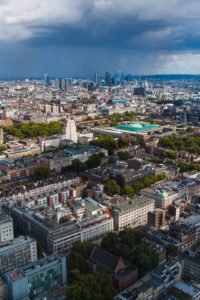
I chose to use a photo I took from the BT Tower in London for this experiment. It’s the 9th tallest building in the city, so works out pretty well. Of course, you could just hold your camera above your head and still produce a high-angle shot.

Horizon

Now, it’s pretty clear that if you’re using a photo with a horizon in it, then it’s not as high as it could be. That’s not to say that it wouldn’t work though, because it can, in fact, the I nearly used the photo below for this experiment.

So long as you keep the horizon at the top of the frame, and make sure that the rest of the photo is interesting, it can work really well. Read more about using high horizons here.BT Tower London 8469 High Angle – 30 Day Photography Challenge Tips

Orientation

Whether you’re shooting in portrait or landscape, can make a big difference to the feel of your photo as it changes the balance and feeling of stability. We all know that a long flat bottom is going to be sturdier than the tall, skinny, precarious image. This is magnified when you look down because we start to lose our sense of balance. BT Tower London 8536 High Angle – 30 Day Photography Challenge Tips

When there’s no horizon in particular, it’s hard to find a balance.

DOWN

This is the photo that I chose for day 5, because it meets the criteria: it looks down so that you can’t see a horizon at all, and views a familiar sight, from an unfamiliar angle.

This is what you’re looking for.

You can do this with anything, perhaps out of your apartment onto the street below, or looking down from a cliff to some people on the beach.

It doesn’t even have to be that high.

The reason I love this sort of shot is because it breaks free from the sort of photography that I’m personally used to. I take so many photos of people from my height, or from my hip, that I often forget about other possible angles. BT Tower London 8568 High Angle – 30 Day Photography Challenge Tips

If you would like to keep track of the 30 Day Photography Challenge, come on over to my Facebook page, Twitter and/or Pinterest, and share your photos with me and the rest of the community. The best ones will be included in these posts. Alternatively, you can leave a comment below. (Note: if you’re linking from Facebook, be sure to ‘copy image address’).

Your Photos

5 Patrick Connolly High Angle – 30 Day Photography Challenge Tips

Patrick Connolly

Pin this. icon wink High Angle – 30 Day Photography Challenge Tips High Angle – 30 Day Photography Challenge Tips High Angle – 30 Day Photography Challenge Tips

Texture – 30 Day Photography Challenge Tips

Today is Day 4 of the 30 Day Photography Challenge, and today’s challenge is to take a photo using texture. Now, when I talk about texture, I’m not talking about a smooth feeling, I’m talking about rough. You could use a smooth form, and lots of objects to create an interesting texture, but for now, lets keep it rough.

You can follow the project, and submit your own photos on my Facebook page, Twitter and/or Pinterest.

Lighting

Hard lighting works best. When the lighting source is bright, and close to the object that you’re taking a photo of, this is when the lighting is at its hardest. This is because the light can only illuminate the object at a certain angle, which creates contrast in the image, which can easily be made into texture.

I find that midday lighting when the sun is really harsh and leaving lots of contrast, is a great time to achieve texture lighting in your photos. Which is good, because it’s not a good time to take most other sorts of photos.

The smaller the object, the harder the lighting needs to be, to work for the texture.

Fill the Frame

The feeling of texture is always at it’s greatest when it fills the frame of a photo, and not just a small section in the centre of the frame. But why is this? Well, when we go from the left to right, top to bottom, it fills the whole frame, and doesn’t appear to end. Because of this, our minds assume that the texture spans further than just the frame, and that increases the feeling of texture by making it feel like it’s larger.

Quantity

The more there is of the texture, the greater it feels. You could have 5 rough rocks in a photo, which will have an element of texture to it, but imagine if there was 200 of these rocks in the photo, wouldn’t the feeling of texture be much greater?

When you start to increase the number of individual objects in a scene, they start to become seen less as their individual parts, and more as an entire texture.

It works, but don’t overdo it; you don’t want a group of rocks to look like a bucket of sand.

Size

If the object is too small, then it’s not providing enough detail to be considered texture, and conversely, if the object is too big, there isn’t going to be enough individual objects in the frame to portray a certain texture. You need to find the right size, and quantity, and this is where the crop comes in.

I chose this photo because not only does it fill the frame, but there is also a good number of rocks in the photo, varying in size and depth, which has led to some interesting contrast and texture.IMG 2587 2011 05 24 at 12 30 40 1 Texture – 30 Day Photography Challenge Tips

Crop

Use a zoom lens, or your feet to change the crop of the frame of which you’re taking the photo. As you zoom in and out, you’ll start to notice what works best for your texture, with a combination of both quantity and size. The photo which I’ve ended up using is a good middle ground. If I was too close, it wouldn’t have worked, and if I had moved back much further, then it wouldn’t have filled the whole frame.

Form Vs Texture

Form relates to the single object, whereas texture relates to a group of objects as a whole. The form of a person may be smooth, and nicely shaped, but when you take 200 of these people, and zoom out, you no longer notice the form, and see more of a texture.

The texture is the sense of touch, even if we can’t touch it.

Texture doesn’t have to fill the whole frame though, you can use texture in small parts of the photos too. I personally like using texture in the background of a photos, perhaps in a portait, to make the photo more interesting.

Here’s the original photo, with no effects added.IMG 2587 2011 05 24 at 12 30 40 2 Texture – 30 Day Photography Challenge Tips

Post Processing

Now, I don’t make big changes in post, but here’s what I did to this photo.

I thought at first that it would work really well in black and white, because if you were paying attention yesterday, you’ll know that black and white focuses more on form and texture, than anything else.

Having added a black and white filter, this was the result.IMG 2587 2011 05 24 at 12 30 40 3 Texture – 30 Day Photography Challenge Tips

It’s good, but not really as good as it could be, because the difference in colour on the rocks is lessened, so the texture added in the colour difference has disappeared.

This is what I decided on, I boosted the contrast to increase the texture, and I slightly desaturated the photo. This made the colour relevant, without being too overbearing.IMG 2587 2011 05 24 at 12 30 40 1 Texture – 30 Day Photography Challenge Tips

Lets see your photos! Leave a comment below, or leave a link on the fan page under the correct link, or post it on the wall. If you’re copying straight from Facebook, please remember to copy the image location/URL and not just the link in the address bar.

You can follow the progress of this project on FacebookTwitter and Pinterest.

Your Photos

4 Bert Happel Texture – 30 Day Photography Challenge Tips

Bert Happel

4 Tc.@.Expics Texture – 30 Day Photography Challenge Tips

Tc.@.Expics

4 amanda osborne Texture – 30 Day Photography Challenge Tips

Amanda Osborne

Thanks for reading, and don’t forget to pin this! icon wink Texture – 30 Day Photography Challenge Tips Texture – 30 Day Photography Challenge Tips 1 Texture – 30 Day Photography Challenge Tips

Black & White – 30 Day Photography Challenge Tips

It’s now Day 3 in my 30 Day Photography Challenge, and today’s challenge is to tackle the black & white photos. This isn’t my first time that I’ve covered black and white, and you can read about it here, and here. I suggest that you should, but for the sake of this article, I’m going to give you a run down.

First thing’s first, shoot in colour.

But this is black and white, what are you talking about Josh?

I know it’s black and white, but if you shoot in colour, you have more options when it comes to editing it later. It’s really simple, when you shoot in colour, you get three colour channels, red, green, and blue. When you convert the photo to monochrome, you can adjust each channel to change how the black and white looks.

Ok, so I’m glad that’s sorted; shoot in colour.

Here’s the photo in colour, after all the post processing that I did, with the exception of the enhance section (I’ll get to that). This is before the change to black and white.Lauren Blue Bells Emily Helenes 2012 04 20 at 19 46 56 33 1 Black & White – 30 Day Photography Challenge Tips

Think in Black and White

When you shoot in black and white, it’s more important to consider form, shape, and contrast than anything else. When you remove the colour details, your attention is focused onto other elements of the photos, like removing one of your senses. The black and white also helps them to stand out.

The smoothness of the model’s skin, very nicely contrasts with the texture of the background, and the form of her body encourage you to explore her shape more.

Her body is broken up into sections, at the top you have her face, which is in the tree section of the background. This is the first contrast, with only very light shadows on her face.

Next you have her upper body, where her soft skin compliments the soft bokeh blur of the blue bells in the background, while still managing to contrast.

Finally, you have her dress at the bottom of the frame. Looking at it now, it probably wasn’t the best choice, because it can seem to look a little bit lost in the frame, but this again enhances the contrast in the photo.

ISO is not so Important

The worst part about digital noise, in my opinion, is the colour of the grain. It usually comes through as some dodgy brown and blue haze on the photo, and I really hate that. But when you’re shooting in black and white, it’s really not so important anymore, because you’re not going to see it like that.

Boost that ISO until your heart’s content.

Post Processing

I’ve done more post processing to this photo than I would with most, and that’s because I can get away with it much easier. I’ve changed the exposure, black point, contrast, saturation, vibrancy, highlights, and added a vignette. I wouldn’t normally do this much with colour photography, but here’s the result.Lauren Blue Bells Emily Helenes 2012 04 20 at 19 46 56 33 2 Black & White – 30 Day Photography Challenge Tips

When you change it to black and white though, you can barely tell what I’ve done to it, although you can probably tell that there has been some changes made to the photo.

Here’s the final image.Lauren Blue Bells Emily Helenes 2012 04 20 at 19 46 56 33 Black & White – 30 Day Photography Challenge Tips

If you would like to keep track of the 30 Day Photography Challenge, come on over to my Facebook page, Twitter and/or Pinterest, and share your photos with me and the rest of the community. The best ones will be included in these posts. Alternatively, you can leave a comment below. (Note: if you’re linking from Facebook, be sure to ‘copy image address’).

Your Photos

Stefanie HeuwerthDom Black & White – 30 Day Photography Challenge Tips

Noel M. Ilustrisimo562456 3041615084833 1396745634 32078048 24947057 n Black & White – 30 Day Photography Challenge Tips

Robert J Photography384594 273436592713199 262048657185326 789032 1512140070 n Black & White – 30 Day Photography Challenge Tips

Alex Veliz149338 416465078371717 302004636484429 1538699 581188635 n Black & White – 30 Day Photography Challenge Tips

Bert Happelbw rose2 Black & White – 30 Day Photography Challenge Tips

Thanks for reading, Pin This.

icon wink Black & White – 30 Day Photography Challenge Tips Black White – 30 Day Photography Challenge Tips Black & White – 30 Day Photography Challenge Tips

Click Like!

Rule of Thirds – 30 Day Photography Challenge Tips

It’s now Day 2 in my 30 Day Photography Challenge, and today’s challenge is to tackle the rule of thirds. This is a great rule, and pretty much the first rule that photographers learn when it comes to composition. Here’s my full article on the Rule of Thirds.

You should read the full article, but I’m going to give you a brief summary of points that you will want to pay attention to when working around the rule of thirds.

Firstly lets have a look at what the rule is.

The rule basically dictates that photos should be split into 9 equal parts; 2 equally-spaced horizontal lines and 2 equally-spaced vertical lines, and that important features within the frame should intersect with these lines at some point.

It looks something like this. Rule of Thirds – 30 Day Photography Challenge Tips

Now you may have noticed that when you come to crop your photos that you’re provided with a guide containing the rule of thirds. This is no accident. It’s best to get it right in the camera and not crop at all, but sometimes, needs must.

Lets start by looking at my photo, which has been poorly cropped. By not paying attention to the rule, the photo is messy, and whereas I was originally looking past the face on the right, it seems to intrude much more into the photo. Overall, this is pretty sloppy composition. Screen shot 2012 05 01 at 14.17.11 Rule of Thirds – 30 Day Photography Challenge Tips

Now lets have a look at the difference when I meet one of the intersect points with the eye of the subject.

Screen shot 2012 05 01 at 13.43.30 Rule of Thirds – 30 Day Photography Challenge Tips

The difference is clear. When you’re composing your photo with the rule of thirds, then it pays to line up important parts of the image with either the lines or the intersect points. The eyes have the strongest visual weight out of anything in this photo, so they’re always an obvious location for an intersect point.

The eye isn’t the only point in the photo that I’ve used though. The light in the background is also located at another intersect point, and there are obvious lines (black at the top, brown at the bottom) on the left side of the frame, which follow the lines of composition. Paying attention to small details like this can make a big difference (and add balance).

The point of using the rule of thirds is that you can create a much more interesting photo. It opens up space in the frame to look into the background and what else is going on in the frame. It works especially well with candid photography because it’s all about providing a sense of detail about what’s going on, without being too intrusive.

It doesn’t just work for photos of people though, there’s also buildings, and landscapes and so on.

If you want to make your photos more interesting, then this is the go-to rule that you should try. Of course, when I say rule, I don’t mean rule (they’re guides really), but they’re called rules to make it easier for us to understand their purpose.

Here’s the final photo, with the grid taken off. It makes it less obvious why this photo works, but we know that it does.Lauren Blue Bells Emily Helenes 2012 04 20 at 22 58 52 128 Version 2 Rule of Thirds – 30 Day Photography Challenge Tips

So remember:

    • The rule of thirds adds depth
    • Intersect import points at intersect points
    • Match up important lines to the thirds lines
    • Be creative and don’t take the rule too seriously
    • Don’t overdoo it!

Read more about the Rule of Thirds here.

Your Photos

Bert Happel30days rule thirds Rule of Thirds – 30 Day Photography Challenge Tips

Patrick Connolly538768 3478867543170 1615712867 2692396 1590832569 n Rule of Thirds – 30 Day Photography Challenge Tips

Alex Veliz525539 415961545088737 302004636484429 1537058 1877735946 n Rule of Thirds – 30 Day Photography Challenge Tips

Pin this icon wink Rule of Thirds – 30 Day Photography Challenge Tips rof3 Rule of Thirds – 30 Day Photography Challenge Tips